

{{#if (not signed_in)}} {{#is help_center.name "Ideagen Help"}} {{#link "sign_in" class="unified-navigation--btn-primary"}}Sign in{{/link}} {{else}} {{#link "sign_in" class="unified-navigation--btn-primary"}}Sign in{{/link}}
{{/is}} {{/if}} {{#if signed_in}}
 {{#is help_center.name "Ideagen Help"}}
Manage tickets
{{else}} {{#link "requests" role="menuitem"}}
Manage tickets {{/link}} {{/is}}
Update profile
Change password
Privacy Policy
Terms of Use
{{#link "sign_out" role="menuitem" class="signOut"}}
Sign out {{/link}}
{{/if}}
{{#is help_center.name "Ideagen Help"}}
Manage tickets
{{else}} {{#link "requests" role="menuitem"}}
Manage tickets {{/link}} {{/is}}
Update profile
Change password
Privacy Policy
Terms of Use
{{#link "sign_out" role="menuitem" class="signOut"}}
Sign out {{/link}}
{{/if}}
{{user.name}}
Looking for help?
Common queries
Send us feedback

Before you start
This form is for Ideagen Luminate feedback only. Your submission will not receive a response.
Looking for support? Select the solution you need help with and open a ticket with us.
We'd love to hear your thoughts on features, usability, or what you love about Ideagen Luminate.

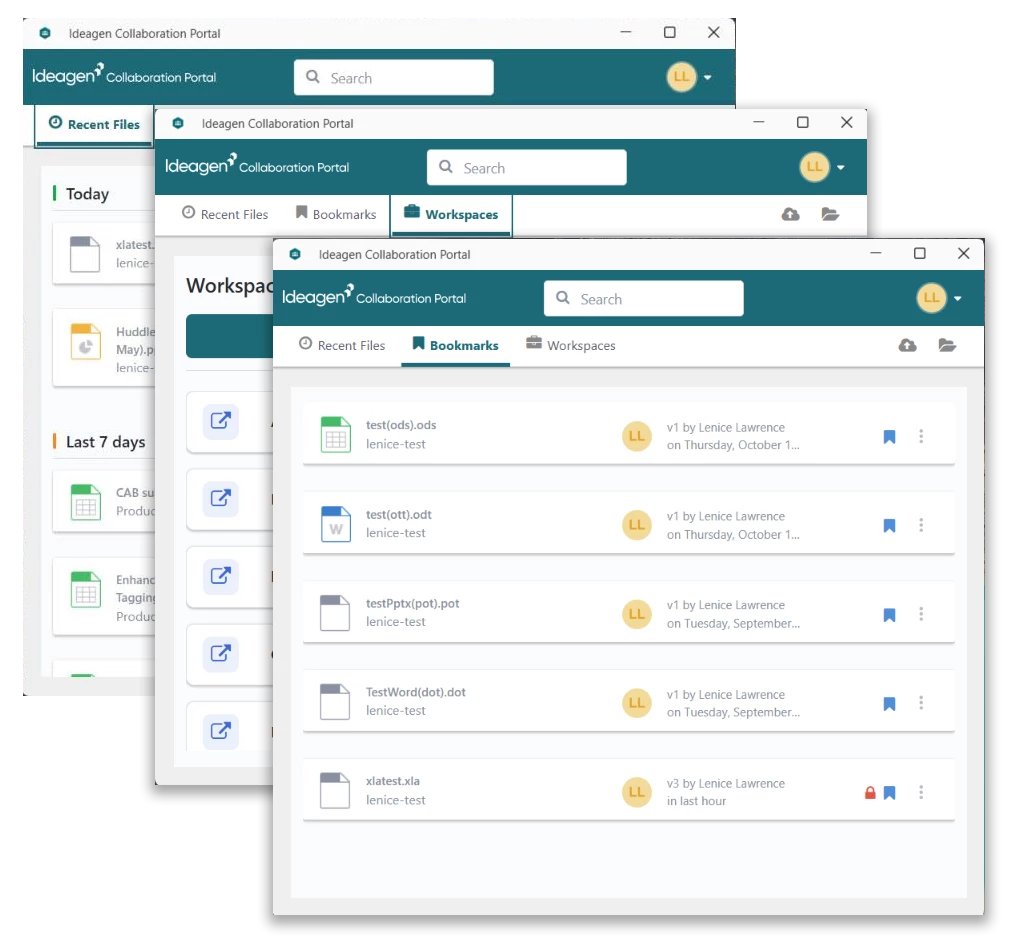
Introducing the New Ideagen Collaboration Portal Desktop — v5.0


 +1
+1
A faster, more modern desktop experience for Windows and macOS
We're excited to announce the release of Ideagen Collaboration Portal Desktop v5.0 — a major modernization of the desktop application you rely on to securely access, edit, and upload documents across your workspaces.
This release represents a ground-up rebuild of the desktop client, delivering a more responsive, modern, and consistent experience on both Windows and macOS.
What's New
Modernized Technology
The new desktop application has been rebuilt using modern technologies, including a React-based user interface and the latest .NET runtime. This means faster load times, smoother interactions, and a more reliable experience overall.
Refreshed User Interface
-
Windows 11 Fluent Design — the app now follows modern Windows design conventions with an updated title bar and controls
-
Consistent cross-platform look — whether you're on Windows or macOS, the interface is clean, familiar, and easy to navigate
-
Improved tooltips and descriptions — clearer guidance throughout the app to help you work more efficiently
Core Features You Know and Trust
All the capabilities you depend on are still here:
-
Open and edit files directly from your workspaces
-
Upload documents to any workspace you have access to
-
Recent Files — quickly access documents you've recently opened or uploaded
-
Bookmarks — save and return to your most important files
-
Workspace browsing — navigate your workspace folders seamlessly
-
Search — find files across your Recent Files, Bookmarks, and Workspaces
Security & Reliability
-
OAuth 2.0 authentication — secure, modern sign-in flow
-
Code-signed installers — both Windows (MSIX) and macOS installers are digitally signed for your security
-
Improved error handling — clearer, more helpful error messages when something goes wrong (e.g., permission issues, offline scenarios)
Cross-Platform Support
-
Windows — Windows 10 (build 19041) and later
-
macOS — supported via native macOS build
What's Changing
| Area | What to Expect |
|---|---|
| Installation | New MSIX-based installer on Windows; updated macOS installer |
| Sign-in | Same credentials — modernized sign-in screen |
| File operations | Open, edit, upload, and browse work the same way |
| System tray | Streamlined options for a cleaner experience |
| Offline behaviour | Improved messaging when you're disconnected |
How to Get Started
-
Uninstall your old application
-
Download the latest installer from, Huddle Desktop App – Collaboration Portal | Help | Ideagen Luminate
-
Install the latest application — it will replace the previous version
-
Sign in with your existing Ideagen Collaboration Portal credentials
-
You're ready to go — your workspaces, recent files, and bookmarks will be available immediately
Frequently Asked Questions
Do I need to do anything to migrate?
No. Simply uninstall your old application and install the new version and sign in. Your workspaces and files remain unchanged — they are stored securely in the cloud.
Will the old desktop app still work?
We recommend upgrading to v5.0 to benefit from the latest improvements and security updates. The previous version will be retired in due course.
Is there any downtime?
No. The update is to the desktop client only — there is no impact to the Ideagen Collaboration Portal web service.
What if I encounter an issue?
Please contact your IT administrator or raise a support ticket through the usual channels. Our team is standing by to help.
Thanks
The Collab Portal Team
Coming from Skills? Create an Ideagen Luminate account to link your learner profile. Learn more.
Coming from Skills? Create an Ideagen Luminate account to link your learner profile. Learn more.
Coming from Skills? Create an Ideagen Luminate account to link your learner profile. Learn more.
Coming from Skills? Create an Ideagen Luminate account to link your learner profile. Learn more.
Login with SSO
Ideagen Employee Login Login with Ideagen Mazlan Homeor
Enter your E-mail address. We'll send you an e-mail with instructions to reset your password.