

{{#if (not signed_in)}} {{#is help_center.name "Ideagen Help"}} {{#link "sign_in" class="unified-navigation--btn-primary"}}Sign in{{/link}} {{else}} {{#link "sign_in" class="unified-navigation--btn-primary"}}Sign in{{/link}}
{{/is}} {{/if}} {{#if signed_in}}
 {{#is help_center.name "Ideagen Help"}}
Manage tickets
{{else}} {{#link "requests" role="menuitem"}}
Manage tickets {{/link}} {{/is}}
Update profile
Change password
Privacy Policy
Terms of Use
{{#link "sign_out" role="menuitem" class="signOut"}}
Sign out {{/link}}
{{/if}}
{{#is help_center.name "Ideagen Help"}}
Manage tickets
{{else}} {{#link "requests" role="menuitem"}}
Manage tickets {{/link}} {{/is}}
Update profile
Change password
Privacy Policy
Terms of Use
{{#link "sign_out" role="menuitem" class="signOut"}}
Sign out {{/link}}
{{/if}}
{{user.name}}
Looking for help?
Common queries
Send us feedback

Before you start
This form is for Ideagen Luminate feedback only. Your submission will not receive a response.
Looking for support? Select the solution you need help with and open a ticket with us.
We'd love to hear your thoughts on features, usability, or what you love about Ideagen Luminate.

Solved
track who obsolete doc in the system


The QM department has reported that a specific document has been marked as obsolete in the system. They would like to track and identify the user who performed this action, along with the date and time it occurred.
Could anyone please advise which database tables or logs we should check to retrieve this information?
Your guidance is appreciated.
Best answer by Monika Blinstrubyte
Hi
This information is usually available as a “Note” in the “Properties” section on the Document record.
It should look like this:
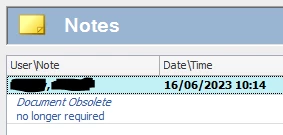
Hope this helps,
Monika


Coming from Skills? Create an Ideagen Luminate account to link your learner profile. Learn more.
Coming from Skills? Create an Ideagen Luminate account to link your learner profile. Learn more.
Coming from Skills? Create an Ideagen Luminate account to link your learner profile. Learn more.
Coming from Skills? Create an Ideagen Luminate account to link your learner profile. Learn more.
Login with SSO
Ideagen Employee Login Login with Ideagen Mazlan Homeor
Enter your E-mail address. We'll send you an e-mail with instructions to reset your password.