Leaving Ideagen Luminate

This link leads to an external site. Only proceed if trusted. Ideagen is not responsible for external content.

Ideagen Luminate logo Ideagen Luminate logo
  • Community

    Start a conversation

    Collaborate with industry experts, ask questions and share best practices.

    Visit Community
    • Forums

      Explore our forums and start a discussion
    • Events

      Browse upcoming and on-demand events
    • Luminate updates

      See the latest updates to the platform
    • Recent activity

      See what others are talking about
    • Unanswered questions

      Help others by answering questions
  • Help

    Explore solution guides

    Discover our comprehensive library of solution guides, articles and roadmaps.

    Visit Help
    • All solutions

      Explore our solutions to find the documentation you need
    • Resources

      Access general information, announcements and more
  • Skills
  • Support
Navigation
{{search submit=false instant=settings.instant_search class='search search-full' placeholder='Search for articles, announcements and more'}}
Need help?
Send feedback
{{#if (not signed_in)}} {{#is help_center.name "Ideagen Help"}} {{#link "sign_in" class="unified-navigation--btn-primary"}}Sign in{{/link}} {{else}} {{#link "sign_in" class="unified-navigation--btn-primary"}}Sign in{{/link}} {{/is}} {{/if}} {{#if signed_in}}
{{user.name}}
{{#is help_center.name "Ideagen Help"}} Manage tickets {{else}} {{#link "requests" role="menuitem"}} Manage tickets {{/link}} {{/is}} Update profile Change password
Privacy Policy Terms of Use
{{#link "sign_out" role="menuitem" class="signOut"}} Sign out {{/link}}
{{/if}}
{{search submit=false instant=settings.instant_search class='search search-full' placeholder='Search for articles, announcements and more'}}
This page does not meet FedRAMP security standards. Please avoid entering sensitive or classified information. Learn more
Learn more
Learn more

Looking for help?

Common queries

View all
How do I use Ideagen Luminate?
How do I create or access my accounts?
How do I get in touch with Support?
How do I manage my Support tickets?
I can't sign in or open a Support ticket!
Where do I go to access e-learning?
I can't find my product anywhere!
Where can I use FedRAMP data?
Back Open

Send us feedback

Before you start

This form is for Ideagen Luminate feedback only.

Your submission will not receive a response. To request solution support, open a ticket with us.

We'd love to hear your thoughts on features, usability, or what you love about Ideagen Luminate.

Ideagen Community Logo
      • Community
      • Recent activity
      • Unanswered questions
      • News
      • Announcements8
      • Feature spotlight4
      • General1
      • Ideagen Audit Analytics
      • Discussions15
      • Ideagen Aviation Safety • Cora (Formerly Coruson)
      • Discussions3
      • Ideagen EHS • Priya (Formerly ProcessMAP / Ideagen EHS)
      • Discussions22
      • Ideagen Collaboration Portal (Formerly Huddle™)
      • Discussions8
      • Ideagen Please Review
      • Discussions10
      • Ideagen Smartforms (Formerly MiCo / Smartforms Professional)
      • Discussions5
      • Ideagen Quality Control • Professional (Formerly Inspection Xpert (IXOD) 2.0)
      • Discussions4
      • Ideagen Quality Control • Enterprise (Formerly Inspection Xpert 3.0 / Quality Control Essentials)
      • Discussions6
      • Ideagen Quality Management • Professional (Formerly Q-Pulse QMS)
      • Discussions163
      • Ideagen Quality Management • Core (Formerly Qualtrax / Quality Management Essentials)
      • Discussions35
      • Ideagen Workplace Training (Formerly WorkRite)
      • Discussions9
      • Ideagen Healthcare Guardian (Formerly InPhase)
      • Discussions34
      • Ideagen Policy Logic (Formerly CompliSpace)
      • Discussions3
      • Ideagen EHSQ • Enterprise (Formerly the DevonWay platform)
      • Technology updates19
      • Discussions0
      • Ideagen Mail Manager
      • Discussions7
      • Ideagen Audit & Risk Management
          • Discussions1
          • Discussions1
          • Discussions0
      • Ideagen EHS • Core (Formerly Lucidity)
      • Discussions3
      • Ideagen Machine Safety (Formerly Plant Assessor)
      • Discussions0
      • Ideagen Mail Manager • Enterprise (Formerly OnePlace)
      • Discussions1
      • Ideagen Compliance (Formerly ConvergePoint)
      • Discussions1
      • Ideagen Safe Food (Formerly SafeFood 360°)
      • Discussions1
      • Ideagen Supply Chain (Formerly Authenticate)
      • Discussions1
      • Ideagen Workforce Safety (Formerly Damstra)
      • Discussions2
      • Ideagen Risk Management • Ion (Formerly Pentana Risk / Risk Management)
      • Discussions0
      • Ideagen Internal Audit • Aura (Formerly Pentana Audit / Internal Audit)
      • Discussions0
      • Ideagen Internal Audit • Alto (Formerly Pentana MK / Internal Audit MK)
      • Discussions0
  • Ideagen Help
Ideagen Community Logo
  • Create a post
  • Sign In
  • Ideagen Luminate
  • Community
  • Ideagen Quality Management • Professional (Formerly Q-Pulse QMS)
  • Discussions
  • How to group mandatory document acknowledgements for new starters

Solved

How to group mandatory document acknowledgements for new starters

  • Forum|Forum|23 days ago
    December 22, 2025
  • 5 replies
  • 75 views

B
Thinker
Forum|alt.badge.img+1
  • Beatrix B
  • Thinker

I’m looking for advice on how to set up the Documents module more efficiently for the following scenario.

We have several documents that are mandatory reading for new starters and require formal acknowledgement. Currently, this process is very admin-heavy. When a new employee joins, I add them to the People module, then for each individual document I have to manually add their name in the Distribution tab and the Copyholder/Acknowledgement field so they can acknowledge it. This has to be repeated for every mandatory document.

Is there a way to group these acknowledgements for new starters, so that all required documents are assigned at once rather than individually?

Any suggestions would be greatly appreciated. Thank you for your help.

Best answer by Jordi Comas

Hi, from desktop version, you can create a virtual folder grouping all mandatory documents.

On the other hand, you can assign by default all new users to a “Joiners” group.

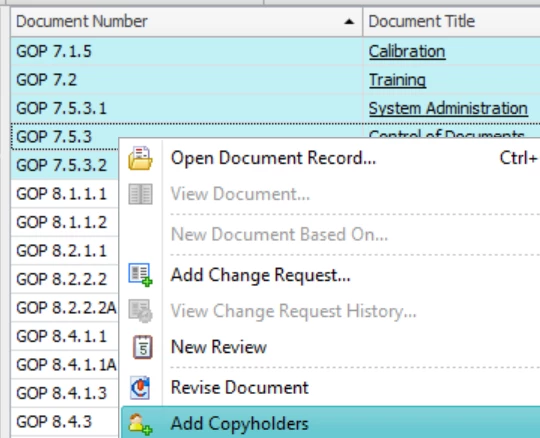
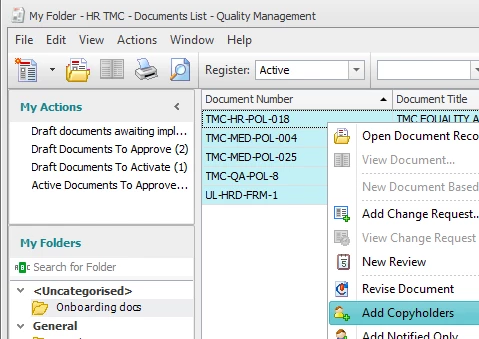
So, you just need to have a manual step (maybe 1/week or 1/month) to select all documents and click “Add Copyholders”:
 

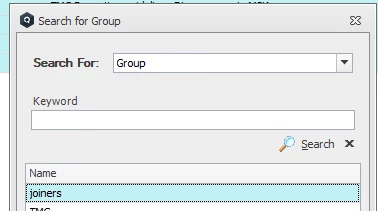
Then, select the joiners group:
 

Once everything is OK, you can remove these people from joiners group.

Best,

    • Like
    • Share

    5 replies

    • Newest first
    • Best voted
    Jordi Comas
    Thinker
    Forum|alt.badge.img+1
    • Jordi Comas
    • Thinker
    • Best answer
    • Forum|Forum|22 days ago
      December 23, 2025

    Hi, from desktop version, you can create a virtual folder grouping all mandatory documents.

    On the other hand, you can assign by default all new users to a “Joiners” group.

    So, you just need to have a manual step (maybe 1/week or 1/month) to select all documents and click “Add Copyholders”:


    Then, select the joiners group:


    Once everything is OK, you can remove these people from joiners group.

    Best,

      • Like

      D
      Thinker
      Forum|alt.badge.img
      • dloughlin
      • Thinker
      • Forum|Forum|9 days ago
        January 5, 2026

      As the other user says, once you have the list of documents identified, you just have to multiselect the documents then right click to see the add copyholders, once they are added. right click again and the option to distribute document will show up, then you can just click that and they are all distributed 


        • Like

        B
        Thinker
        Forum|alt.badge.img+1
        • Beatrix B
        • Author
        • Thinker
        • Forum|Forum|9 days ago
          January 5, 2026

        Thank you for the feedback. 

        These documents will be distributed to new starters probably monthly. Do I need to remove the ones that acknowledged the documents before I add the next “new starters” group? And if so, do I need to do this individually for each document by removing the names from the Distribution tab/Copyholders field? 

        • Like

        Jordi Comas
        Thinker
        Forum|alt.badge.img+1
        • Jordi Comas
        • Thinker
        • Forum|Forum|8 days ago
          January 6, 2026

        You can keep adding more copyholders (no need to remove previous ones).

        • Like

        B
        Thinker
        Forum|alt.badge.img+1
        • Beatrix B
        • Author
        • Thinker
        • Forum|Forum|7 days ago
          January 7, 2026

        Hi, from desktop version, you can create a virtual folder grouping all mandatory documents.

        On the other hand, you can assign by default all new users to a “Joiners” group.

        So, you just need to have a manual step (maybe 1/week or 1/month) to select all documents and click “Add Copyholders”:


        Then, select the joiners group:


        Once everything is OK, you can remove these people from joiners group.

        Best,

        Hi ​@Jordi Comas, thank you for your reply. Could you please let me know how can I assign all new users to a “Joiners” group by default? 


        Thanks again, really appreciate your help here. Kind Regards,   Beatrix

        • Like

        Become a Quality Management: Professional Certified Administrator

        Learn more
        Powered by Gainsight
        Terms of UseCustomise cookiesAccessibility statement

        logo_full-color.svg

        Sign inSign up

        Login with SSO

        Ideagen Employee Login Login with Ideagen Hub
        or

        logo_full-color.svg

        Sign inSign up

        Login with SSO

        Ideagen Employee Login Login with Ideagen Hub
        or
        Forgot your password?

        Enter your E-mail address. We'll send you an e-mail with instructions to reset your password.

        Back to overview

        Scanning file for viruses.

        Sorry, we're still checking this file's contents to make sure it's safe to download. Please try again in a few minutes.

        OK

        This file cannot be downloaded

        Sorry, our virus scanner detected that this file isn't safe to download.

        OK
        CommunityAll forumsEvents Ideagen Luminate News
        Get in touch Open a Support ticket Contact sales
        Useful linksAll Help documentation All Skills courses Resources
        Get in touch Open a Support ticket Contact sales
        Ideagen Corporate news Events and webinars

        Connect with us
        ©  Ideagen
        Privacy PolicyTerms of Use Data Protection PolicyEnvironmental Policy Slavery and Human Trafficking Statement